Introduction
What is np?
np is a NixVim configuration designed for Project Oriented Development (POD).
It provides a pre-configured Neovim setup that you can import and customize per
project without polluting your global environment.
Key Features
- No Pollution: Project-specific configs via Nix flakes.
- Modular: Base config + opt-in langs (languages) and xtras (tools/features).
- Nix-Powered: Reproducible builds and easy overrides.
Project Oriented Development
Thanks to Nix, we enter the era of Project Oriented Development. The concept is simple—development should be focused on projects, rather than user OS or user Home space.
This is the first of our projects in this line—to enable operations focused on projects.
Unlike conventional editors like Zed and VSCode, where workspaces or project config files easily provide tailored experiences, Neovim traditionally lacks built-in project-specific configuration. This makes it challenging to customize the editor per project without polluting the global setup. We don’t want to lose Neovim just because it doesn’t behave project-specific.
This configuration of NixVim ships as a module, so you can import it, override
nixvim options to tailor your Nvim configuration per project, and stop worrying
about editor behaving badly—due to lack of project-specific configurations—and
don’t pollute your OS or Home either.
Important Note
np does not provide custom Nix options. It is a pre-configured NixVim setup
that you extend or shrink by redefining standard NixVim options.
Project Oriented Development
Thanks to Nix, I want to enter the era of Project Oriented Development. The concept is simple — development should be focused on projects, rather than user OS or user Home space.
This is the first of my projects in this line - to enable my operations focused on projects.
Unlike conventional editors like Zed and VSCode, where workspaces or project config files easily provide tailored experiences, Neovim traditionally lacks built-in project-specific configuration. This makes it challenging to customize the editor per project without polluting the global setup. We don’t want to lose Neovim just because it doesn’t behave project-specific.
This configuration of NixVim ships as a module, so you can import it,
override nixvim options to tailor your Nvim configuration per project,
and stop worrying about editor behaving badly - due to lack of project
specific configurations — and don’t pollute your OS or Home either.
Installation
Prerequisites
- Nix with flakes enabled.
nixpkgs-unstable:npis developed againstnixpkgs-unstableand requires packages from it.- Basic knowledge of Nix and NixVim.
Quick Setup
-
Clone or add
npas a flake input in your project. -
Create
nix/nixvim.nixin your project:
{ np, ... }:

{
  imports = [
    np.nixvimModules.base
    np.nixvimModules.langs.javascript
    # Add more langs as needed
  ];

  # Your overrides
}
-
In
flake.nix, build Neovim:Important
npis built onnixpkgs-unstableand requires its consumer to provide packages from it. Using a stable version ofnixpkgswill result in errors.{ inputs = { # np requires nixpkgs-unstable. nixpkgs.url = "github:NixOS/nixpkgs/nixos-unstable"; nixvim.url = "github:nix-community/nixvim"; np.url = "github:ar-at-localhost/np"; }; outputs = { self, nixpkgs, nixvim, np, ... }: let system = "x86_64-linux"; # adjust for your system # Use legacyPackages from nixpkgs-unstable. pkgs = nixpkgs.legacyPackages.${system}; in { devShells.${system}.default = pkgs.mkShell { packages = [ # Other development packages... # Make nixvim with our unstable pkgs and the project-specific module. (nixvim.legacyPackages.${system}.makeNixvimWithModule { inherit pkgs; module = ./nix/nixvim.nix; extraSpecialArgs = { inherit (pkgs) stdenv; }; }) ]; }; }; } -
Enter the shell:
nix develop
For a quick preview of np: nix run .#np
Usage
Configuration
To configure np, create a nix/nixvim.nix file in your project. This file is
a NixVim module where you can import np’s base configuration, add language
langs, and apply your own overrides.
Here is an example for a Python project:
# nix/nixvim.nix
{ np, ... }:

{
  imports = [
    np.nixvimModules.base
    np.nixvimModules.langs.python
  ];

  # Add project-specific settings
  plugins.lsp.servers.nil_ls.enable = false;
}
Remember to pass the np flake input to the module in your project’s flake.nix
using extraSpecialArgs. See the Installation guide for
the full flake.nix setup.
Running Neovim
- In your project’s dev shell:
nvim - Preview base
np:nix run .#np
Examples
Full-Stack Web Project
# nix/nixvim.nix
{ np, ... }:

{
  imports = [
    np.nixvimModules.base
    np.nixvimModules.langs.web  # Includes JS/TS, HTML, CSS, etc.
  ];
}
Default Experience
This page describes the out-of-the-box experience when using np without any
langs or customizations. It’s the base NixVim configuration that provides a
complete, project-oriented Neovim setup.
Overview
np ships with a curated set of plugins, keybindings, and settings designed
for efficient development. The focus is on usability, discoverability,
and non-pollution—everything stays project-specific via Nix.
Key highlights:
- Leader Key: Space (
<Space>) - Theme: Catppuccin with full UI integration
- Session Management: Automatic save/restore for git repositories
- Completion: Blink.cmp with LSP integration
- Search: Snacks picker for fuzzy finding
- Diagnostics: Trouble for workspace issues, custom signs and virtual text
UI & Theme
The interface uses Catppuccin theme with integrations for a cohesive look.
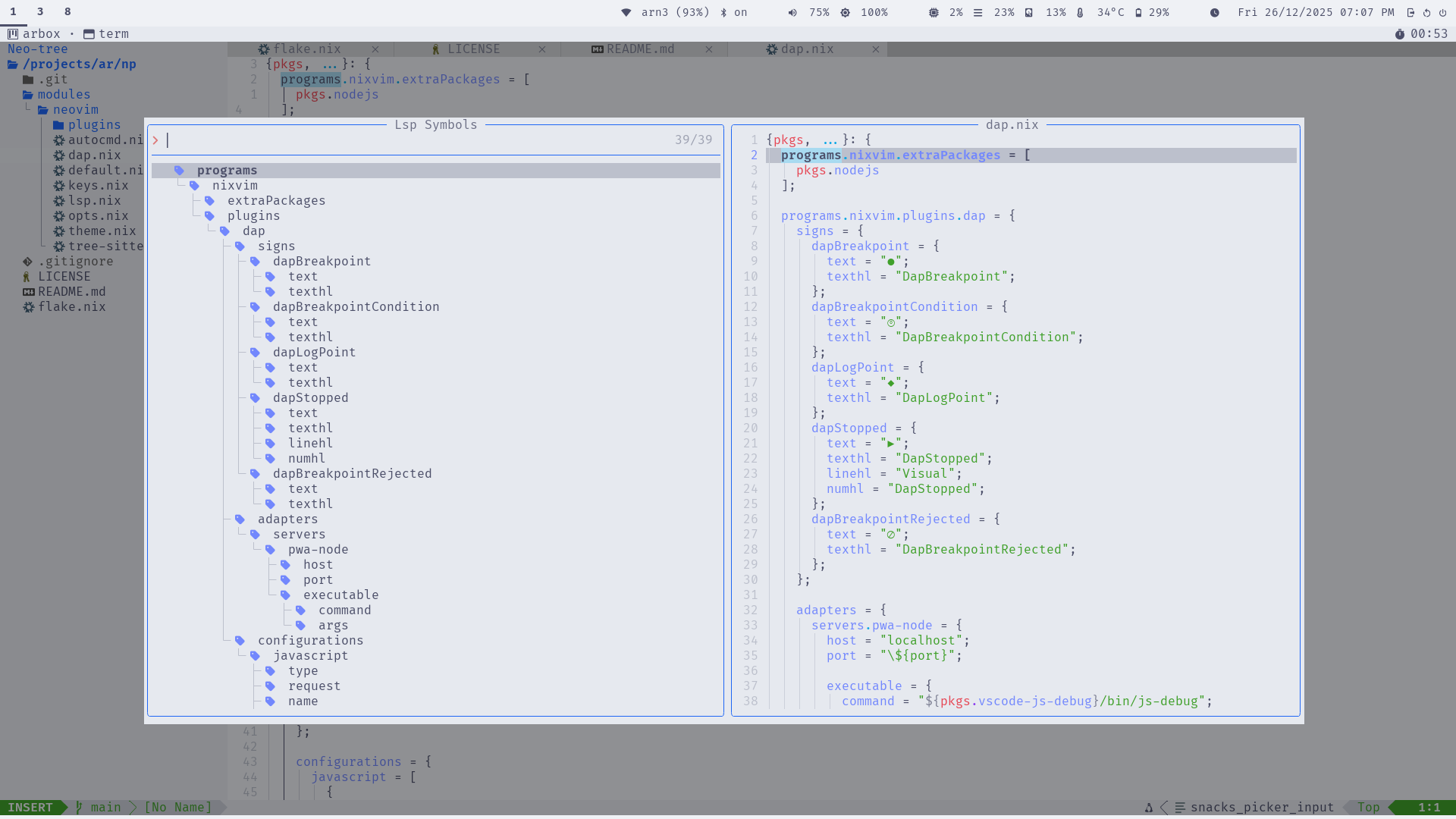
- Status Line: Lualine with LSP status, git info, and diagnostics
- Buffer Tabs: Bufferline with close buttons and indicators
- File Explorer: Neo-tree sidebar with git status
- Notifications: Noice for command-line and messages
- Diagnostics Panel: Trouble for workspace-wide issues
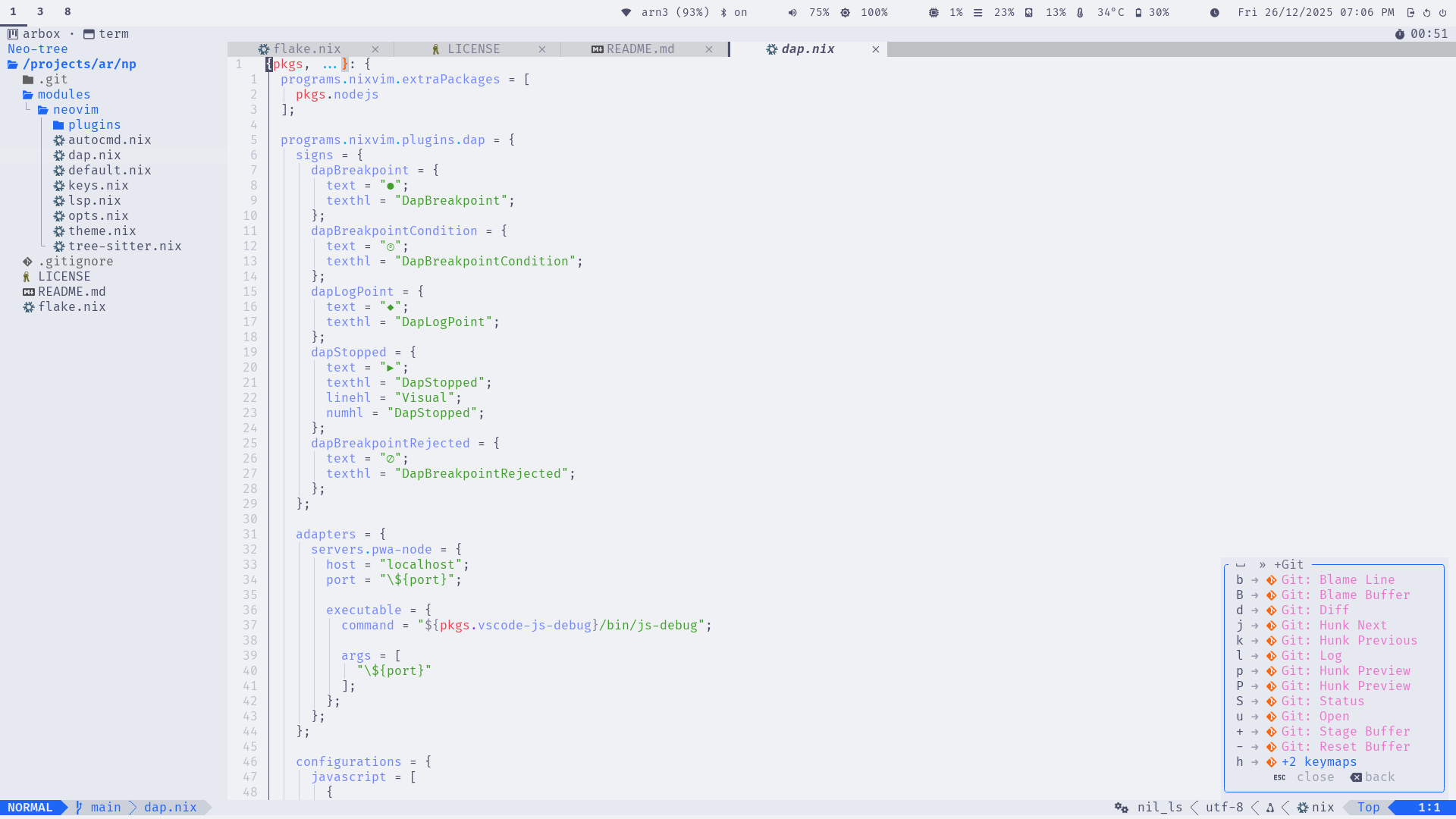
- Key Hints: Which-key for discoverable bindings
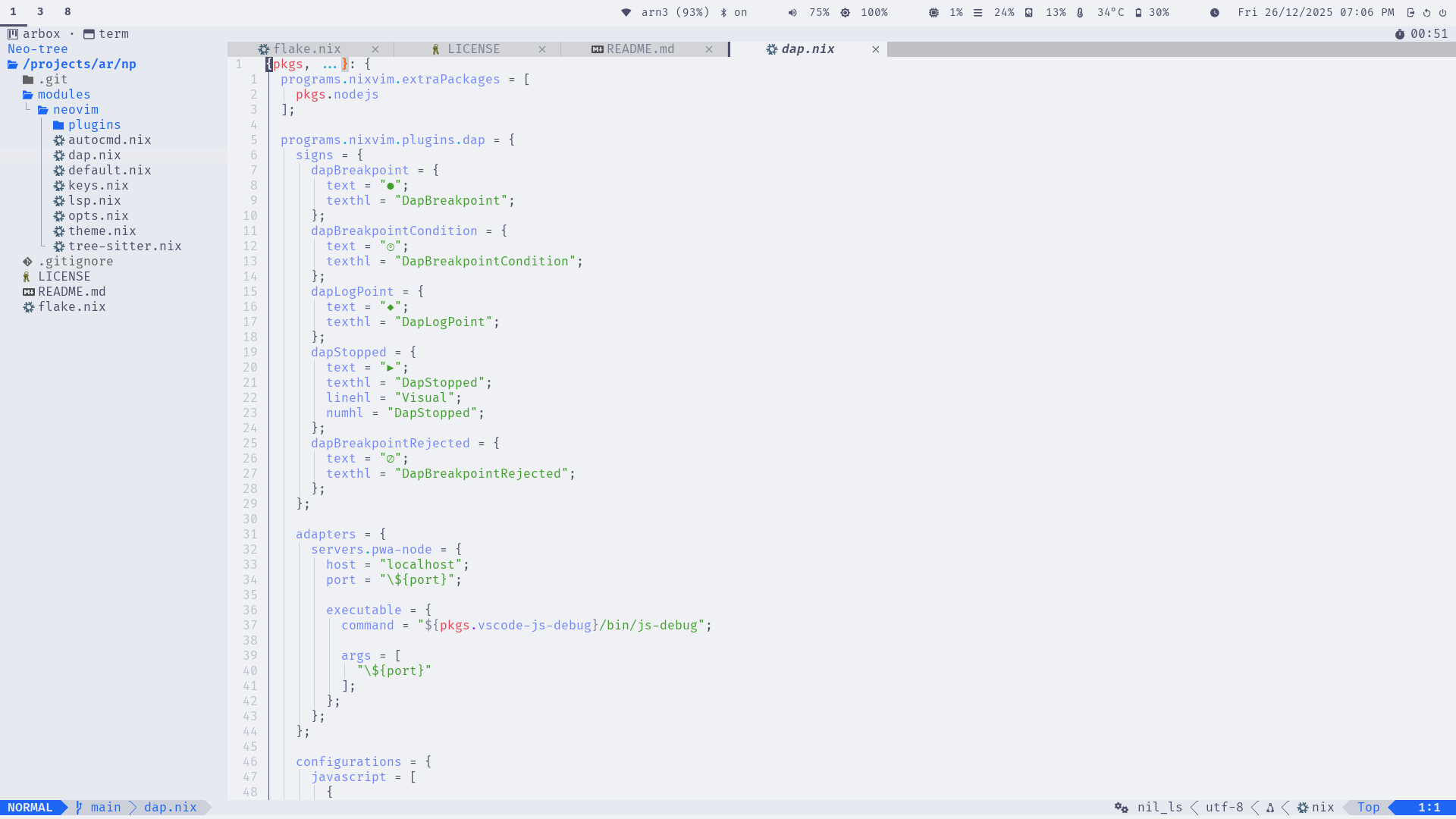
Screenshots
Editor View
Which-Key
LSP
Language Support
LSP Servers
Out-of-the-box support for common config and markup languages:
- Lua: lua_ls (with inlay hints)
- JSON: jsonls
- Markdown: marksman
- Nix: nil_ls
- TOML: taplo
- YAML: yamlls
Diagnostics include custom signs (e.g., for errors) and virtual text with spacing.
Tree-Sitter Parsers
Syntax highlighting and folding for:
- bash, json, lua, markdown, nix, regex, toml, vim, vimdoc, yaml
Folding uses indent method with custom characters.
Keybindings
Bindings are grouped logically under <leader> (space). Use <leader>? or
Which-key to explore.
Core Categories
- Windows (
<leader>w): Navigation, resizing, splitting - Buffers (
<leader>b): Switching, deleting, pinning - Tabs (
<leader><tab>): New, close, navigate - Explorer (
<leader>e): Neo-tree toggle/reveal - Code/LSP (
<leader>c): Rename, actions, definitions, diagnostics - Search (
<leader>s): Files, buffers, grep, replace - Git (
<leader>g): Neogit, hunks, blame, log - Notifications (
<leader>n): History, dismiss - Session (
<leader>sl): Load last session - Debugger (
<leader>d): Breakpoints, stepping, UI
Examples
<leader>sf: Search files<leader>cd: Go to LSP definitions<leader>gu: Open neogit<C-s>: Save file (insert/visual/normal modes)

Plugins
The base setup includes these enabled plugins (categorized):
Completion & LSP
- blink-cmp: Fast completion
- lsp: Core LSP support
- lsp-signature: Function signatures
- lsp-status: Status indicators
- navic: Breadcrumb navigation
UI & Navigation
- bufferline: Buffer tabs
- edgy: Window management
- lualine: Status line
- neo-tree: File explorer
- noice: Notifications
- trouble: Diagnostics panel
- web-devicons: Icons
- which-key: Key hints
Development Tools
- conform-nvim: Formatting
- dap, dap-ui, dap-view, dap-virtual-text: Debugging
- git-conflict: Merge conflict resolution
- gitsigns: Git hunks and blame
- lazydev: Lua development
- none-ls: Linting/formatting bridge
- toggleterm: Terminal integration
- treesitter: Syntax parsing
Utilities
- colorizer: Color previews
- emmet: HTML/CSS snippets
- grug-far: Search & replace
- markview: Markdown rendering
- mini: Collection of small plugins
- snacks: Picker, notifications, terminal
- ts-autotag: Auto-close tags
- ts-comments: Enhanced comments
Extra Plugins
- plenary-nvim: Lua utilities
- nvim-lsp-file-operations: LSP file ops
Session Management
For git repositories, np automatically:
- Saves session on exit (VimLeavePre) to
.nvim/session.vim - Restores session on start (VimEnter) if no files specified
- Handles Neo-tree windows properly
- Adds
.nvim/to.gitignoreif needed
This enables Project-Oriented Development—no global state, per-project persistence.
Customization
The base is designed to be extended:
- Add langs for language support (see Langs)
- Override NixVim options in your project’s
nix/nixvim.nix - Disable unwanted plugins or add new ones
For example, to add Python support:
imports = [
  inputs.np.nixvimModules.base
  inputs.np.nixvimModules.langs.python
];
This keeps your setup clean and reproducible.
Configuration
Overriding Options
Since np uses standard NixVim, customize by overriding options:
{
  imports = [ inputs.np.nixvimModules.base ];

  # Disable a base LSP
  lsp.servers.nil_ls.enable = false;

  # Add a custom plugin
  plugins = {
    myPlugin = {
      enable = true;
      # Config
    };
  };

  # Change keymaps
  keymaps = [
    {
      key = "<leader>f";
      action = ":Telescope find_files<CR>";
    }
  ];
}
Shrinking the Config
Remove unwanted parts by setting enable = false on modules.
Extending
Add your own modules, langs (language support), or xtras (tools/features) on top.
No Custom Options
Remember, np has no custom Nix options—only NixVim’s.
Langs
Provide opt-in support for additional languages and development environments. Import them alongside the base module.
Note
For tool and feature extensions, see Xtras.
Each lang adds LSP servers, formatters, tree-sitter grammars, and sometimes DAP configurations.
Available Langs
- cpp: C/C++ with clangd LSP and make support.
- docker: Docker with dockerls and docker-compose LSP.
- dotnet: .NET with omnisharp LSP and dotnet-format.
- javascript: JavaScript/TypeScript with biome, eslint, vtsls.
- make: Build system support.
- mjml: MJML markup with beautify support.
- python: Python with basedpyright and ruff/black.
- rust: Rust with rust-analyzer.
- sql: SQL syntax highlighting.
- web: Full web stack (includes javascript + HTML/CSS).
- xml: XML support.
See individual pages for details.
C/C++ Lang
Adds support for C and C++ development.
What It Includes
- LSP: clangd for code intelligence.
- Tree-Sitter: Grammars for C and C++.
- Dependencies: Imports the
makelang for build system support.
Usage
imports = [
  inputs.np.nixvimModules.base
  inputs.np.nixvimModules.langs.cpp
];
Notes
Ensure clangd is available in your environment.
Docker Lang
Adds Docker support.
What It Includes
- LSP: dockerls, docker_compose_ls.
- Tree-Sitter: dockerfile.
Usage
imports = [
  inputs.np.nixvimModules.base
  inputs.np.nixvimModules.langs.docker
];
.NET Lang
Adds support for .NET development.
What It Includes
- LSP: omnisharp for C# IntelliSense and navigation.
- Formatters: dotnet-format for C#, fantomas for F#.
- Tree-Sitter: C# grammar.
Usage
imports = [
  inputs.np.nixvimModules.base
  inputs.np.nixvimModules.langs.dotnet
];
Notes
Requires .NET SDK and the tools in your PATH or Nix environment.
JavaScript/TypeScript Lang
Adds support for JavaScript and TypeScript.
What It Includes
- LSP: biome (linter/formatter), eslint, vtsls (TypeScript).
- Formatters: Configured for JS/TS files.
- DAP: Node.js debugging.
- Tree-Sitter: JavaScript, TSX, TypeScript grammars.
- Packages: nodejs.
Usage
imports = [
  inputs.np.nixvimModules.base
  inputs.np.nixvimModules.langs.javascript
];
Make Lang
Adds Makefile support.
What It Includes
- Tree-Sitter: make grammar.
Usage
imports = [
  inputs.np.nixvimModules.base
  inputs.np.nixvimModules.langs.make
];
Python Lang
Adds support for Python development.
What It Includes
- LSP: basedpyright for type checking and intelligence.
- Formatters: ruff (linter/fixer) and black (formatter).
- Tree-Sitter: Python grammar.
Usage
imports = [
  inputs.np.nixvimModules.base
  inputs.np.nixvimModules.langs.python
];
Notes
Requires Python and the tools in your PATH or Nix environment.
Rust Lang
Adds Rust support.
What It Includes
- LSP: rust-analyzer.
- Tree-Sitter: rust grammar.
Usage
imports = [
  inputs.np.nixvimModules.base
  inputs.np.nixvimModules.langs.rust
];
SQL Lang
Adds SQL support.
What It Includes
- Tree-Sitter: sql grammar.
Usage
imports = [
  inputs.np.nixvimModules.base
  inputs.np.nixvimModules.langs.sql
];
Web Lang
Full-stack web development support.
What It Includes
- Imports the
javascriptlang. - LSP: HTML, CSS, Tailwind CSS.
- Formatters: For HTML/CSS.
- Tree-Sitter: CSS, HTML, HTTP, SQL, XML.
Usage
imports = [
  inputs.np.nixvimModules.base
  inputs.np.nixvimModules.langs.web
];
Notes
Covers front-end and some back-end tools.
XML Lang
Adds XML support.
What It Includes
- Tree-Sitter: xml grammar.
Usage
imports = [
  inputs.np.nixvimModules.base
  inputs.np.nixvimModules.langs.xml
];
Xtras
Provide opt-in support for additional tools and features beyond language support. Import them alongside the base module and any langs.
Xtras focus on tools, workflows, and features rather than language-specific development.
Available Xtras
- orgmode: Orgmode support with org-bullets, org-modern, and headlines.
See individual pages for details.
Orgmode
Provides Orgmode support with additional plugins for enhanced editing experience.
Features
- orgmode: Core Orgmode functionality for note-taking, task management, and document organization
- org-bullets: Enhanced bullet point styling for better readability
- org-modern: Modern UI improvements and menu system for Orgmode
- headlines: Enhanced headline styling and visual hierarchy
Configuration
The orgmode extra automatically configures:
- Project-aware agenda files (
orgfiles/**/*in project root) - Project-aware notes file (
orgfiles/notes.orgin project root) - Fallback to
~/orgfiles/**/*and~/orgfiles/refile.orgoutside projects - LSP support for org files
- Blink completion integration with orgmode sources
- Which-key integration under
<leader>oprefix
Usage
-
Import the orgmode xtra:
{ np, ... }: { imports = [ np.nixvimModules.base np.nixvimModules.xtras.orgmode ]; } -
Start using Orgmode with standard keybindings and workflows.
-
Create org files in your project’s
.nvim/orgfiles/directory for project-specific notes.
FAQ
Which language(s) support is configured out of the box?
Answer: Only Nix, Markdown, TOML/YAML, Bash, and Lua.
Which languages are supported?
Answer: Many languages are provided as modules for opt-in basic support. See langs for available options.
Contributing
Development Setup
- Clone / Fork the repo.
- Enter the dev shell:
nix develop - Create a branch from main
- Make changes.
- Create a commit (Please follow conventional commitlint)
- Push
- Open a PR.
Note
Flake is configured to auto-run Flake checks, and Lints.
–
Tip
Repo itself is configured to use
npitself.nviminside repo default shell, isnp.
Guidelines
- Project Oriented Development (POD): POD cannot be sacrificed under any condition. Contributions that pollute the user’s home directory or OS will not be merged. All configurations must remain project-specific and isolated.
- Keybindings: Keys must be grouped logically, prioritizing usability over traditional conventions. This may or may not align with standard traditions.
- Follow NixVim best practices.
- Keep langs minimal and focused.
- Update docs for any changes.
- Strictly follow No Pollution policy.
- Create Lint-free Contributions.
Roadmap
- Clean to be as minimal as possible
- base languages supported
- Nix
- Lua
- Markdown
- TOML/YAML
- base languages supported
- Create comprehensive docs
- Add language langs
- JavaScript / TypeScript
- Rust
- Python
- C/C++
- Docker
- Web (full stack)
- Others (make, sql, xml)
- Add more langs
- Go
- Improve lang documentation and examples
- Support other NixOS channels, than current Unstable